Chat with Flo AI in Slack
Last updated: September 17, 2026
Overview
Beyond the Home tab and slash commands covered in Spendflo App for Slack [Powered by Flo AI], you can also talk to Flo AI directly — ask it a question in plain language and get an answer right inside Slack, backed by your live Spendflo data (spend, contracts, requests, approvals, and more).
There are three places you can do this: a direct message with the Spendflo app, a group message that includes the Spendflo app, and a channel the Spendflo app has been added to. In every case, Flo AI replies as a threaded reply to your message, so the conversation stays organized and follow-up questions keep the context of what came before.
1. In a direct message (DM)
Open (or start) a direct message with the Spendflo app and type your question as a normal message — no tagging required, since it's a 1:1 conversation.
Example: “Show top 5 suppliers by spend”
Flo AI replies in a thread under your message. The reply typically includes:
An Analysis Process section (collapsible) explaining what it looked at to answer the question.
A short written summary of the result.
A data table when the answer involves multiple records — for example, a list of vendors with total spend and contract count.
A suggested follow-up question pre-filled in the reply box, and a note like “Showing 5 of 262 records. Would you like to see details for any specific vendor?” when there's more data available than what's shown.
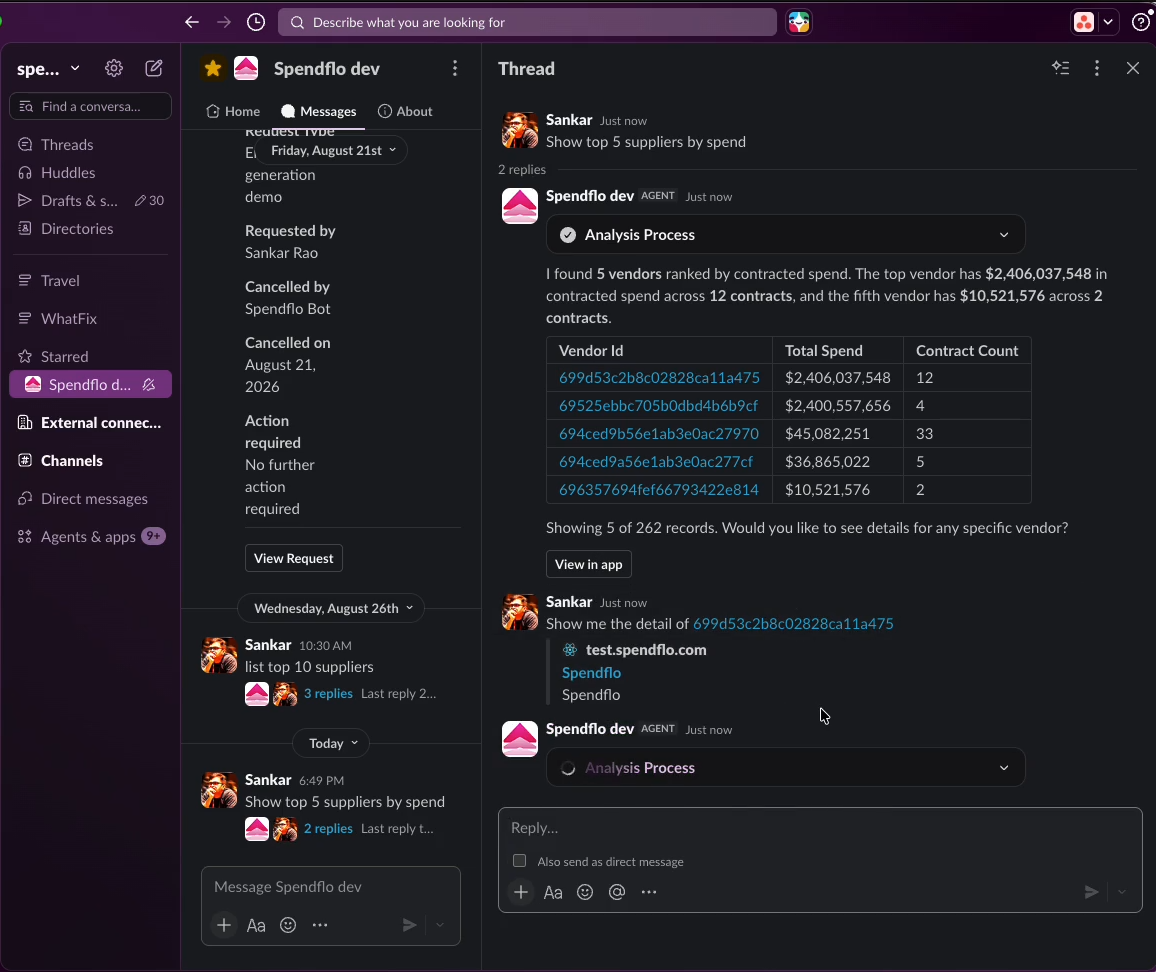
Flo AI's reply lands as a threaded reply in the DM, with a follow-up question answered in the same thread.
Since the reply lands in a thread, you can keep asking follow-up questions in that same thread (e.g. “Show me the detail of <vendor>”) and Flo AI will use the earlier questions and answers in the thread as context.
2. In a group message
A group message is a Slack DM with more than one person. To talk to Flo AI here, the Spendflo app has to be added as a participant of the group message.
If you're starting a new group message, add the Spendflo app to the To: field along with the people you want in the conversation, the same way you'd add any other person.
If the group message already exists without the Spendflo app, Slack will prompt you: “Agents can only be added at the start of direct messages. Want to move this conversation to a private channel that includes Spendflo?” You'll need to either move it to a private channel or start a new group message that includes the Spendflo app from the beginning.
Once the Spendflo app is part of the group, tag it and ask your question:
Example: “@Spendflo dev Show contracts expiring this quarter”
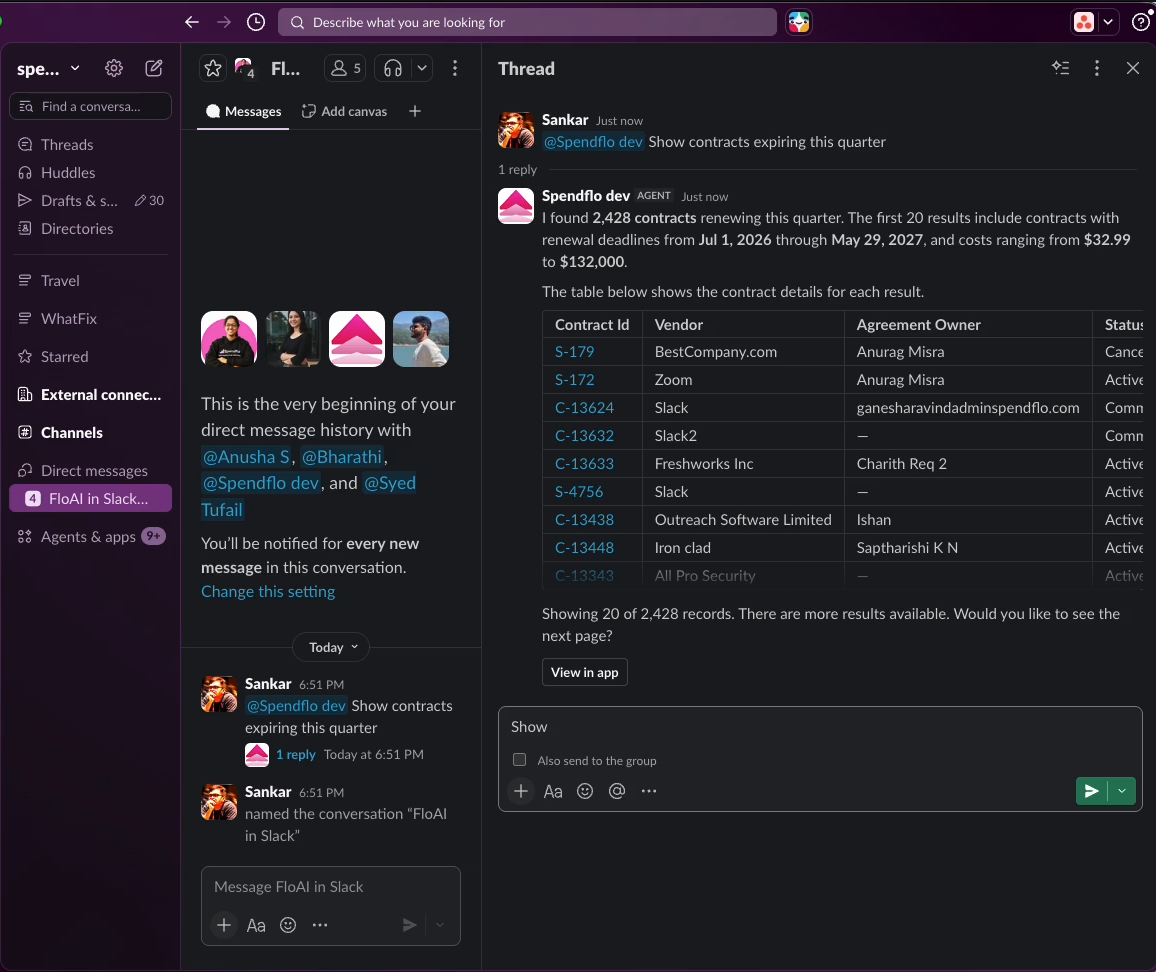
In a group message, Flo AI is tagged directly and replies in a thread visible to everyone in the group.
Just like in a DM, Flo AI replies as a threaded reply under your message, with the same analysis summary and data table format. You (or anyone else in the group) can continue the conversation by replying in that thread — for example, asking “@Spendflo dev show me the details of <contract ID>” as a follow-up, which Flo AI answers using the context of the earlier messages in the thread. When replying in the thread, there's also an Also send to the group option if you want your reply to also post to the main conversation.
3. In a channel
To use Flo AI in a channel, add the Spendflo app to the channel first (via Add people to channel or the channel's integrations). Once added, Flo AI posts an introduction message explaining what it can help with and a few example prompts you can try.
To ask a question, tag the app anywhere in the channel:
Example: “@Spendflo dev List unpaid bills past due”

In a channel, Flo AI introduces itself once added, then replies in a thread whenever it's tagged.
As with DMs and group messages, Flo AI doesn't reply inline in the channel — it replies in a thread under your message, with the summary and data table. This keeps the main channel uncluttered while still making the full answer visible to anyone who opens the thread. Continue asking follow-up questions in the same thread (e.g. “show me the details of invoice <number>”) to drill into a specific record without losing context, and use Also send to #<channel> if you want a particular reply to also be visible in the main channel.
How the conversation is maintained
Across all three surfaces — DM, group message, and channel — the pattern is the same:
Your question stays as the top message.
Flo AI's answer arrives as a reply in a thread underneath it, not as a new standalone message.
Every follow-up question you ask in that same thread is answered with awareness of the earlier questions and answers in the thread, so you can drill down (e.g. from a list of vendors, to one vendor, to one contract) without repeating context.
Starting a new question outside the thread (a fresh message) starts a new, separate conversation.