Understanding the agreements listing table
Last updated: June 26, 2026
Overview
The Agreements Listing Table in Spendflo presents an organized view of all active and historical contracts with vendors. Each agreement is displayed with essential details such as contract name, start and end dates, auto-renewal status, and financial metrics like total and annualized costs.
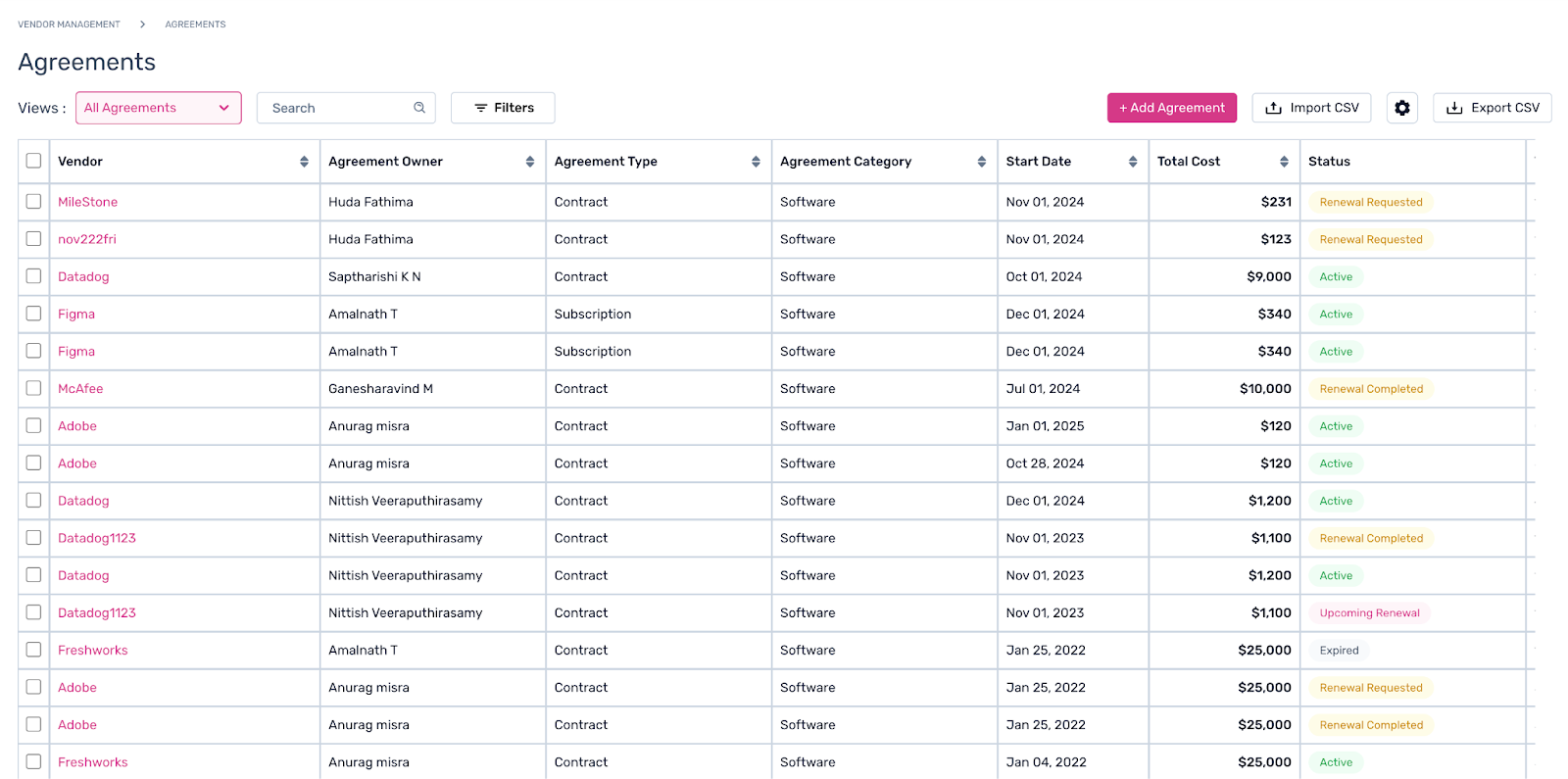
This structured layout helps teams track agreement terms, stay informed about upcoming renewals, and make quick decisions regarding contract extensions or negotiations. Users can filter the table by vendor, agreement status, and renewal dates to efficiently manage their agreement portfolio and optimize costs.
Learn more about the agreements listing tab and its components from the following descriptions -
Component | Description |
Vendor | The name of the vendor associated with the agreement, providing clarity on the supplier of services. |
Offering(s) | Lists the specific products or services covered by the agreement. |
Agreement Owner | The internal stakeholder responsible for managing the contract, overseeing compliance, renewals, and terms. |
Agreement Type | Specifies the type of agreement, such as a long-term contract or a recurring subscription. |
Agreement Category | Categorizes the agreement based on service type. The agreement category is provided by the user. |
Start Date | The date when the agreement becomes effective, marking the beginning of the contract term. |
End Date | The date on which the current contract term expires, prompting renewal or cancellation considerations. |
Auto-Renewal | Indicates if the agreement will automatically renew without manual intervention. |
Total Cost | The complete cost of the agreement for the entire contract period. |
Annualized Cost | The yearly cost of the agreement, breaking down the total for budgeting purposes. |
Status | Current status of the agreement, such as Active (ongoing agreements), Commencing soon (contracts with start date in the future) or Expired- (end date has lapsed). |
Cancel by Date | The last permissible date for canceling the agreement to avoid auto-renewal penalties. |
Cancellation Date | The date on which the subscription is canceled, ending its term. |
Next Billing Date | The upcoming date for the next scheduled payment, relevant for recurring billing agreements. |
Term (Months) | The length of the Agreement term in months, helping track agreement duration. |
Billing Frequency | Specifies how often payments are made, such as monthly, quarterly, or annually. |
Payment Terms | The payment terms outline the conditions and timelines for payments, such as Net 30 or Net 60, specifying when payments are due. |
First Quote | The initial quote received for the contract, useful for reference during negotiations or renewals. |
Last Quote | The final quote for the contract, reflecting any price adjustments or discounts. |
Savings | This data showcases the difference between Last Quote and First Quote. |
Renewal Stage | Indicates the stage of the renewal process (e.g., Not Started, In Progress, Completed). The renewal stage is applicable only for Contracts. |
Spendflo Procured | Shows if the contract was procured directly through Spendflo’s platform, ensuring centralized management. |
In Spendflo Pipeline | Indicates if the contract is In Spendflo's pipeline for procuring (Will it be bought with our Assisted Buying Services). |
Tags | Custom tags added to the agreement for easier categorization and searchability. |
Actions | Provides options to take actions like, editing, or canceling the agreement directly from the table. |
Note: If an agreement is marked as cancelled, then the renewal stage will automatically be marked as Not Renewing.Key Benefits
Quick Access: View all the essential contract details in a single table for efficient management.
Sorting & Filtering: Easily sort agreements by renewal date, vendor, or cost to focus on priority contracts.
Renewal Management: Identify upcoming renewals and take action directly from the table.
Cost Visibility: Track total and annualized costs to optimize budgeting and financial planning.
For more details on managing agreements with custom views, filters and search functions, click here.