Configuring renewal notification frequency & escalations
Last updated: August 10, 2026
Overview
Renewal Configuration controls when renewal reminders go out and who gets escalated as a contract's renewal date approaches. It's part of Basic Configuration in Settings, under Renewal Configuration.
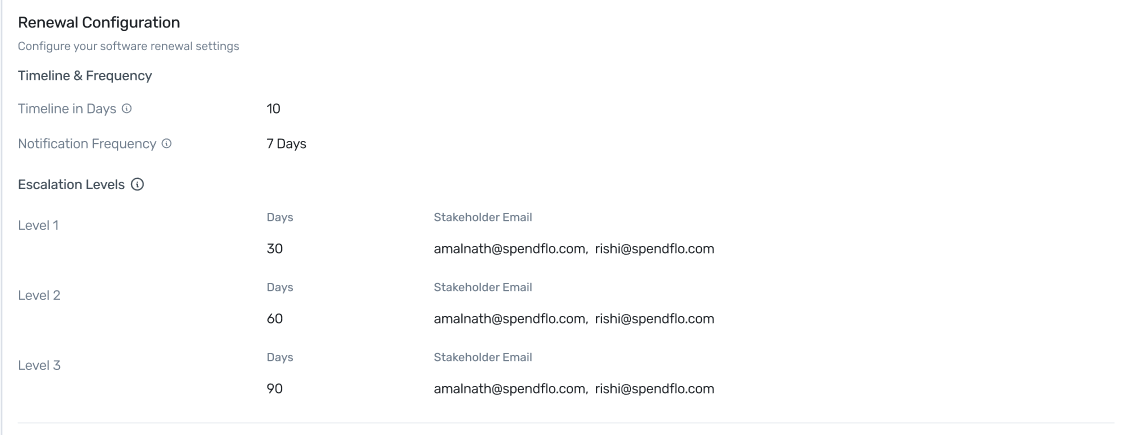
Renewal Configuration, under Basic Configuration in Settings.
Timeline & Frequency
Timeline in Days — how many days before a contract's renewal date Spendflo starts treating it as an upcoming renewal (for example, 10 days out).
Notification Frequency — how often reminder notifications repeat once a renewal enters that window (for example, every 7 days).
Escalation Levels
Beyond the standard reminders, you can configure up to three escalation levels, each firing at a specific number of days before renewal and notifying a chosen set of stakeholders:
Level 1, 2, and 3 — each has its own Days value (days before renewal) and Stakeholder Email list. Levels typically escalate further out to closer in — for example, Level 1 at 30 days, Level 2 at 60 days, Level 3 at 90 days — so more people get looped in as the deadline approaches.
Each level can notify multiple stakeholders — add as many emails as needed, comma-separated.
The renewal timeline should be set higher than the escalation levels' day values, so escalations trigger within the window you're actively tracking a renewal.
Next Steps
For managing renewals day-to-day once they're configured, see Stay on top of your renewals.