Audit trail for AI agent activity
Last updated: September 22, 2026
Overview
Every time a custom agent runs, Spendflo records an audit entry so admins can verify and debug what it did. Open an agent's … menu from Agent Studio and choose Audit Trail to see it.
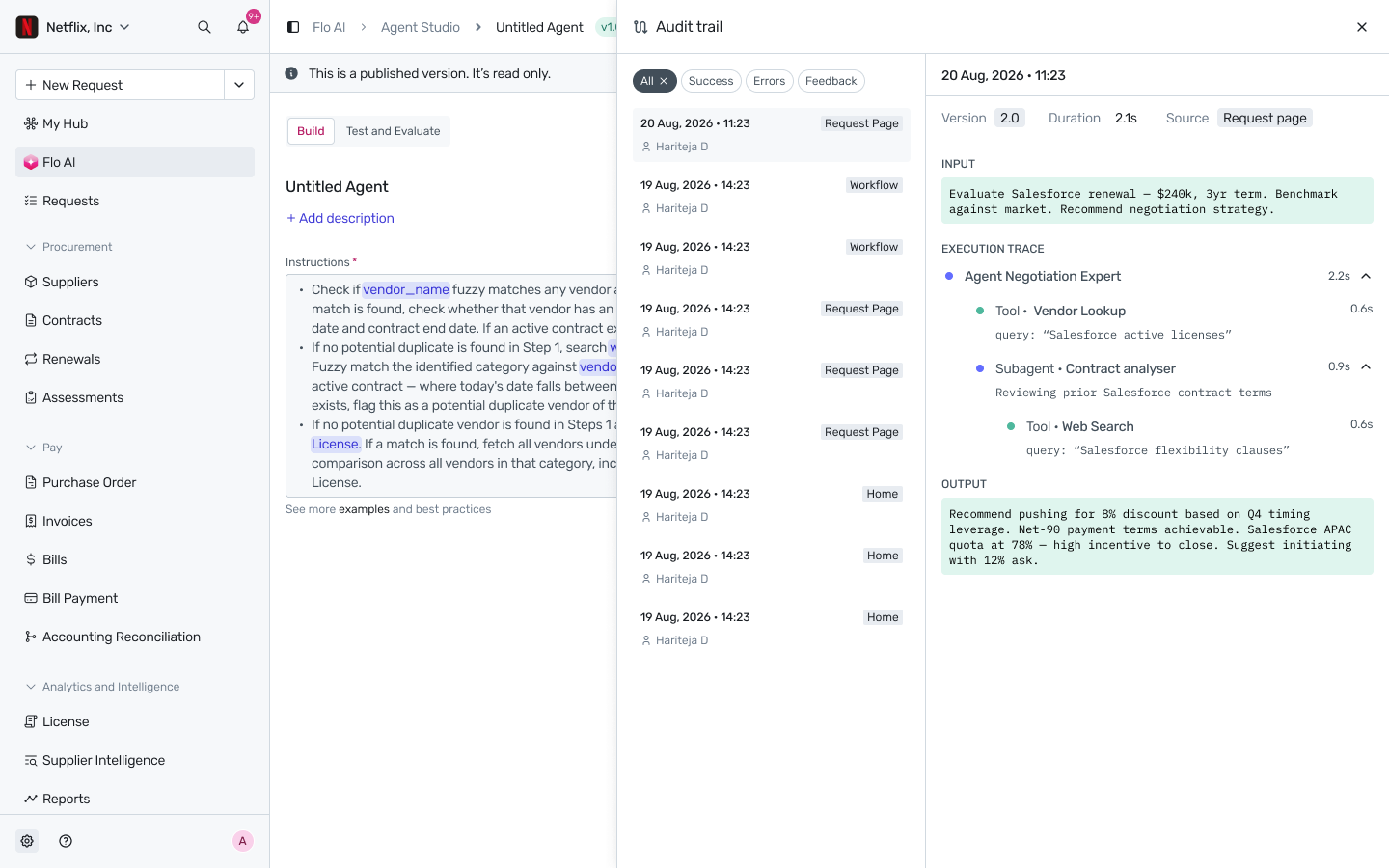
Audit Trail — a run's execution trace, drilled into on the right.
The run list
The left panel lists every run of the agent, newest first — timestamp, the user who triggered it, and the source it ran from (for example, Request Page, Workflow, or Home). Filter the list to All, Success, Errors, or Feedback to narrow it down. Click any run to see its full detail on the right.
What a run's detail shows
Selecting a run opens:
Version, Duration, and Source — which published version of the agent handled this run, how long it took, and where it was triggered from.
Input — exactly what was sent to the agent.
Execution Trace — a nested, timed breakdown of everything the agent did to produce its answer: which expert/agent handled the request, which tools it called (for example, a vendor lookup or a web search) and how long each took, and any subagents it delegated to along the way — each with their own tool calls nested underneath. This is what makes an agent's reasoning auditable rather than a black box.
Output — the agent's final response.
Who can see it
The audit trail is only visible to users with audit trail permission. Entries are read-only — they can't be edited or deleted by anyone.